cropped-Horizontal-logo-2.jpg

Sumo ERP

One Stop Solution For SSMS

  • Home
  • About
  • Feature
  • Booking
  • Contact

Home

Monthly Archives: March 2026

32_Roles

Teacher Login & Dashboard

Teachers get a simple, powerful panel to mark attendance, assign homework, upload study materials, manage exams and communicate with students — all in minutes, not hours.

What Is the Teacher Dashboard?

The Teacher Dashboard is a dedicated login for every teacher in the school. From here, teachers manage their classes digitally — without paperwork, without registers, and without wasting class time on administrative tasks.

A teacher in your school can log in from their phone or laptop and complete what used to take 30 minutes in under 3 minutes.

What Teachers Can Do From Their Dashboard

✅ Mark Daily Attendance — Teachers select their class and section, and mark attendance for each student in seconds. The system automatically records the date and notifies absent students’ parents by SMS.

✅ Mark Subject-wise Attendance — For higher classes, teachers can mark attendance separately for each subject or period. This gives a more accurate view of which classes each student is attending.

✅ Assign Homework — Teachers type homework instructions, attach files if needed, and set a deadline. It appears instantly on every student’s portal and the parents receive an SMS.

✅ Upload Study Materials — PDF notes, reference sheets, assignments — teachers upload them to the portal once and every student in the class can download them.

✅ Add YouTube Video Lessons — Teachers share YouTube video links as part of the learning material. Students watch them from their dashboard.

✅ Create Lesson Plans — Teachers can create structured lesson plans subject-by-subject and chapter-by-chapter, keeping teaching organised and trackable.

✅ Enter Exam Results — After exams, teachers enter marks subject-wise. The system calculates grades and ranks automatically.

✅ Manage Leave Requests — Teachers can apply for leave through the portal. School management approves or rejects from the admin panel.

✅ View Class Timetable — Teachers see their own timetable — which class they teach, when and where.

Why This Saves 10+ Hours Per Week

Most teachers spend 45 minutes to 1 hour every day on attendance registers, homework tracking, and mark entry. The Teacher Dashboard reduces this to under 10 minutes per day — giving teachers more energy and time for actual teaching.
Read More

Parent Login & Dashboard

The Parent Dashboard is a private online portal that every parent or guardian receives when their child is enrolled. Parents log in using their own credentials and see everything related to their child’s school life — updated in real time.

What Parents Can See and Do

✅ Live Attendance Updates — Parents see whether their child attended school today, this week, and this month — with exact dates and percentage.

✅ Instant SMS Alerts — The moment a teacher marks a child absent, the parent receives an automatic SMS on their phone. No delay, no manual call from the school.

✅ Exam Results & Report Cards — As soon as results are published, parents view subject-wise marks, grades, and the child’s rank in class — instantly from their phone.

✅ Fee Status & Online Payment — Parents see all pending fees, due dates, and payment history. They can pay school fees directly from the parent portal using UPI, Razorpay, PayTM or bank transfer — at any time, from anywhere.

✅ Homework Visibility — Every homework assigned to their child appears on the parent dashboard with the subject and due date. Parents receive an SMS when new homework is assigned.

✅ School Notices — Important announcements from school management appear on the parent dashboard immediately. No paper notices that get lost in a school bag.

✅ Download Fee Receipts — After every payment, a digital receipt is available on the parent portal. Parents never need to visit school just to collect a receipt.

Why Parents Love This Feature

In a study of schools using ERP systems, parent engagement increased by over 40% when real-time portals were introduced. When parents feel informed and involved, students perform better, fee payments arrive on time, and the school’s reputation improves through word of mouth.

Show parents this dashboard in your next school admission presentation. It is one of the most convincing features for both parents and school management.

Read More
60_Student Dashboard

Student Login & Dashboard

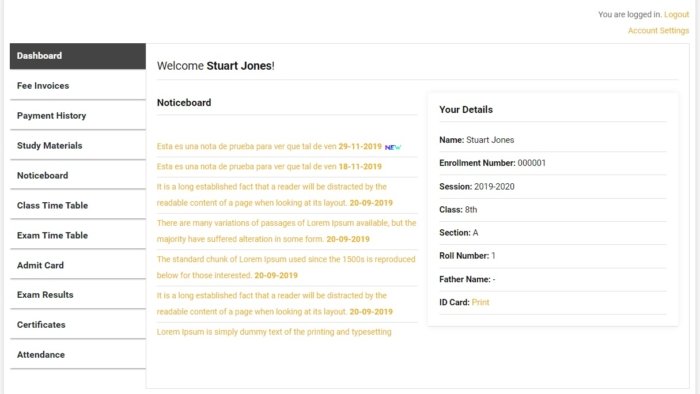
The Student Dashboard is a personal online portal that every student gets when they are enrolled in your school through Sumo ERP. It is their own private space where they can log in from any phone, tablet or computer and find everything they need about their school life — without calling the office or asking a teacher.

Think of it as a student’s complete school record, available 24 hours a day, 7 days a week.

What Students Can Do After Logging In

✅ View Daily Attendance — Students can see a full month-by-month attendance record. They know exactly how many days they were present, absent or late — with dates.

✅ Check Exam Results — As soon as results are published by the school, students see their subject-wise marks, grades and overall rank in their class — instantly on their dashboard.

✅ Download Admit Cards — Before every exam, students download their own admit card directly from their portal. No need to collect it from school.

✅ See Class Timetable — The weekly class timetable is always visible on their dashboard, updated by the school admin.

✅ Access Homework — All homework assigned by teachers appears on the student dashboard with the subject name, description and due date.

✅ Download Study Materials — Teachers upload PDF notes, assignment sheets and reference documents. Students download them anytime — even from home.

✅ Watch Video Lessons — Recorded video lessons and YouTube links shared by teachers are accessible directly on the student portal.

✅ View Fee Status — Students can check which fees are paid and which are pending — without asking the school office.

✅ Submit Complaints / Tickets — If a student has a problem or query, they can raise a support ticket directly from their dashboard.

Who Benefits From This Feature?

This feature directly benefits students who can track their own progress and stay prepared — and it benefits school management by reducing the number of daily queries to the admin office about attendance, results, and timetables.

Why This Matters for Your School

Schools that give students access to their own data see better academic responsibility. When students can see their attendance percentage dropping, they make an effort to attend more regularly. When they see marks subject-by-subject, they know exactly where to focus their preparation.

Book a free demo to see the Student Dashboard live — with real attendance, results and homework displayed.

Read More

Recent Posts

  • Live Classes (Zoom Integration)
  • SMS & Push Notifications
  • Teacher Login & Dashboard
  • Parent Login & Dashboard
  • Student Login & Dashboard

Recent Comments

  • SMS & Push Notifications – sumoerp.com on Book an Appointment
  • Student Login & Dashboard – sumoerp.com on Book an Appointment

Archives

  • May 2026
  • April 2026
  • March 2026
  • February 2026
  • October 2025
  • June 2025
  • October 2024
  • August 2024
  • October 2023
  • August 2022
  • June 2021
  • October 2019

Categories

  • Feature (15)
Booking

Book Service Online

From admissions to results, manage everything from one platform. Schedule a free demo and discover how easy school management can be.

Booking
cropped-Horizontal-logo-2.jpg

Sumo ERP

One Stop Solution For SSMS

  • Home
  • About
  • Feature
  • Contact

© 2026 Sumo ERP. All rights reserved.
Instagram Linkedin-in Facebook-f Twitter
Shopping Basket