
Sumo ERP

One Stop Solution For SSMS

  • Home
  • About
  • Feature
  • Booking
  • Contact

Home

Monthly Archives: October 2023

16_Take Attendance

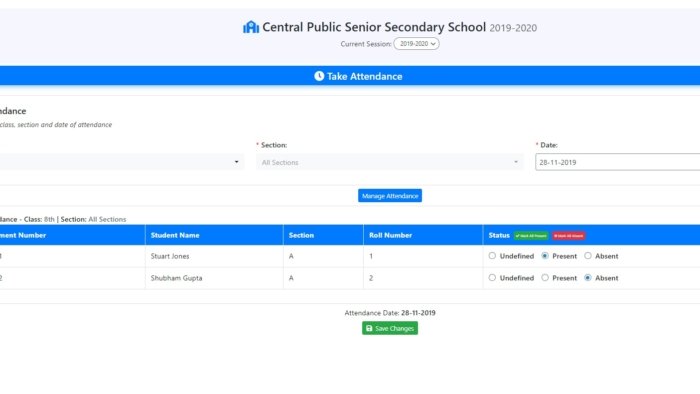
Attendance Management

Mark daily and subject-wise attendance in seconds from any device. Parents get instant SMS alerts on absence. View, filter and print monthly reports anytime.

Why Digital Attendance Matters

Paper attendance registers are error-prone, time-consuming and impossible to search. When a parent asks “how many days was my child absent this term?” — finding the answer takes 20 minutes. With [Your ERP Name]’s attendance system, that answer is available in 3 seconds.

How It Works

A teacher opens their dashboard, selects the class and section, and taps Present or Absent for each student. The whole process for a class of 40 students takes under 2 minutes. The record is instantly saved to the cloud.

What the Attendance Module Includes

✅ Daily Attendance — Taken once per day per class and section.

✅ Subject-wise Attendance — For schools that want period-by-period tracking, attendance can be marked for each subject separately.

✅ Instant Parent SMS on Absence — When a student is marked absent, their parent receives an SMS automatically — within seconds. No staff involvement needed.

✅ Late Mark Tracking — Students who arrive late can be marked as “Late” separately from absent.

✅ Monthly Attendance View — View the full monthly calendar for any student — green for present, red for absent, yellow for late.

✅ Attendance Percentage — The system automatically calculates each student’s attendance percentage for the term and academic year.

✅ Print Attendance Sheets — Need a physical copy? Print attendance reports for any class, section, and date range in one click.

✅ Holiday Integration — Mark school holidays so they are not counted against students’ attendance records.

✅ Staff Attendance — Teachers and staff attendance is also tracked through the same system, separately from students.
Read More
22_Admin Actions for Students

Admin & Staff Dashboard

School administrators and staff get a complete bird’s-eye view of the entire school — students, fees, attendance, exams, staff, and reports — from one central dashboard.

What Is the Admin Dashboard?

The Admin Dashboard is the command centre of Sumo ERP. The school’s principal, admin staff, accountant, and management team each get a login with permissions suited to their role. From here, they manage the entire school without a single paper register.

Multiple staff roles are supported — Admin, Accountant, Receptionist, Librarian — each with customised access so they only see what is relevant to them.

What the Admin Can Do

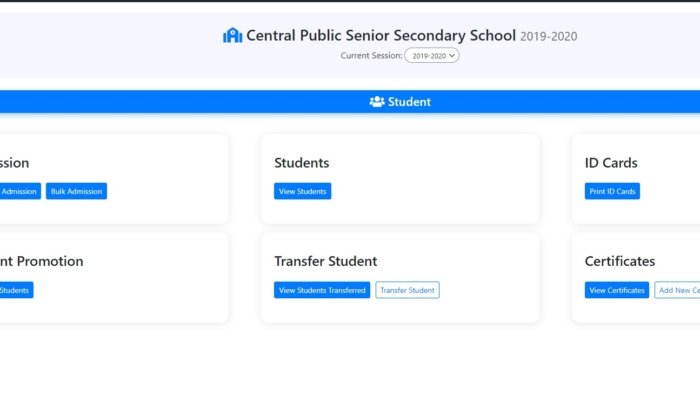
✅ Manage All Students — Add new students, update their class and section, promote them to the next class at year end, or transfer them to another branch. Generate admission numbers automatically.

✅ Set Up Classes, Sections & Subjects — Create the full academic structure of the school — all classes, sections (A, B, C) and subjects — in minutes.

✅ Manage All Teachers & Staff — Add teachers, assign them to classes and subjects, track their attendance, and manage their leave requests.

✅ Session Management — Set up new academic sessions every year. All previous data is preserved and accessible at any time.

✅ Generate All Reports — Attendance reports, fee collection reports, exam result reports, income and expense summaries — all available with date filters and export options.

✅ Publish Results & Notices — When exam results are ready, admin publishes them to student and parent portals with one click. Notices and announcements reach all parents instantly.

✅ Manage Inquiries — Track every admission inquiry from parents. Follow up, convert and enroll students — all from the same system.

✅ Custom Roles & Permissions — Assign different levels of access to different staff members. The accountant sees fees but not academic records. The librarian manages books. You control who sees what.

Read More

Recent Posts

  • Live Classes (Zoom Integration)
  • SMS & Push Notifications
  • Teacher Login & Dashboard
  • Parent Login & Dashboard
  • Student Login & Dashboard

Recent Comments

  • SMS & Push Notifications – sumoerp.com on Book an Appointment
  • Student Login & Dashboard – sumoerp.com on Book an Appointment

Archives

  • May 2026
  • April 2026
  • March 2026
  • February 2026
  • October 2025
  • June 2025
  • October 2024
  • August 2024
  • October 2023
  • August 2022
  • June 2021
  • October 2019

Categories

  • Feature (15)
Booking

Book Service Online

From admissions to results, manage everything from one platform. Schedule a free demo and discover how easy school management can be.

Booking

Sumo ERP

One Stop Solution For SSMS

  • Home
  • About
  • Feature
  • Contact

© 2026 Sumo ERP. All rights reserved.
Instagram Linkedin-in Facebook-f Twitter
Shopping Basket