Sumo ERP

One Stop Solution For SSMS

  • Home
  • About
  • Feature
  • Booking
  • Contact

HomeSMS

Posts tagged: SMS

60_Student Dashboard

Live Classes (Zoom Integration)

May 5, 2026
by websumoerp@gmail.com with No Comment Feature

Teachers start live online classes directly from the ERP dashboard. Students join with one click from their portal. No separate Zoom account setup needed for students.

Online Classes — Built Into Your ERP

Sumo ERP integrates directly with Zoom and BigBlueButton — two of the world’s leading live video class platforms. Teachers do not need a separate Zoom account per class. They start the session from the ERP and it is ready in seconds.

How It Works

For Teachers: Go to Live Classes in the dashboard. Click “Start Class,” select the class and subject. A live session starts on Zoom or BigBlueButton immediately. The link is automatically visible to students.

For Students: Log into the student portal. Click “Join Live Class.” The Zoom class opens in the browser or app. No passwords, no fumbling with links.

What the Live Classes Feature Includes

✅ Zoom Integration — Start and manage Zoom sessions directly from the ERP.

✅ BigBlueButton Integration — A free, open-source alternative to Zoom for schools that prefer it.

✅ One-Click Join for Students — Students join classes from their portal with no extra steps.

✅ Class Scheduling — Schedule upcoming live classes so students see them in advance.

✅ Record Sessions — Record the live class for students who missed it to watch later.

Why Schools Love This

After the COVID-19 period, every school wants a backup system for online teaching. Having live classes built into the same ERP — without a separate subscription for each teacher — saves thousands of rupees per year and makes remote teaching effortless.
Read More
56_School Settings - SMS Templates

SMS & Push Notifications

April 19, 2026
by websumoerp@gmail.com with No Comment Feature

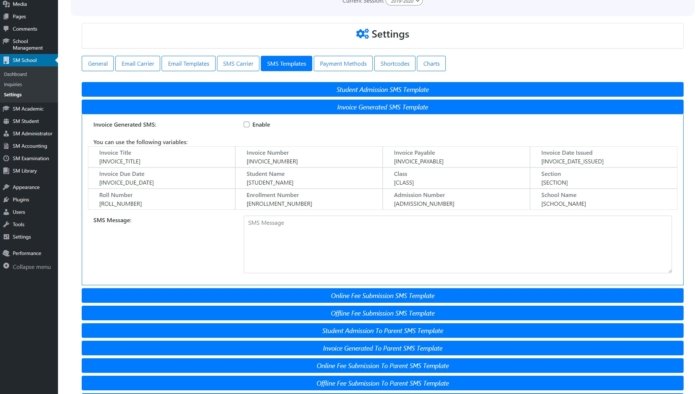
Keep every parent informed automatically. Send SMS alerts for attendance, fee due dates, exam results, homework and school notices — without any manual effort from your staff.

Communication That Runs Itself

The biggest complaint parents have about schools is poor communication. They miss notices, forget fee dates, and are unaware of their child’s performance until the term ends. [Your ERP Name] solves this entirely through automatic, real-time notifications.

How Notifications Are Sent

[Your ERP Name] supports three notification channels:

  • SMS — Delivered to any mobile number via popular SMS gateways
  • Email — Sent to parent and student email addresses
  • Firebase Push Notifications — Appears as mobile phone notifications, just like WhatsApp messages, when the companion mobile app is used

SMS Gateways Supported

TextLocal, MSG91, Twilio, Nexmo, MsgClub, and many more popular Indian and international SMS providers are supported.

What Triggers Automatic Notifications

✅ Absence Alert — Parent receives SMS when child is marked absent

✅ New Homework — Parent receives SMS when teacher assigns homework

✅ Fee Invoice Created — Parent notified when a new fee invoice is generated

✅ Fee Due Date Reminder — Automatic reminder SMS before the due date

✅ Payment Confirmation — Parent receives SMS and email after successful fee payment with receipt

✅ Result Published — Student and parent notified when exam results are published

✅ New Notice / Announcement — School admin sends bulk SMS to all parents with one click

✅ Admission Confirmation — New student and parent receive login credentials and a welcome message via SMS and email

The Result for Your School

When parents receive timely information, they trust the school more, pay fees on time, and refer other parents. Schools using Sumo ERP report a significant reduction in the number of daily phone calls received from parents asking about attendance, fees and results.

Ready to see these notifications in action? Book a free demo and we will show you a live SMS being sent in real time.

Read More
60_Student Dashboard

Student Login & Dashboard

March 10, 2026
by websumoerp@gmail.com with No Comment Feature

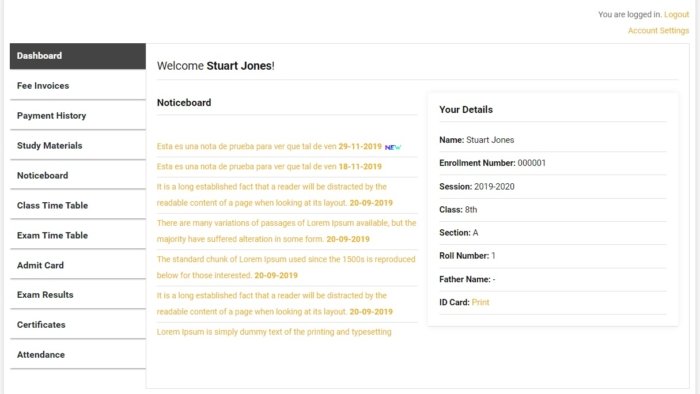
The Student Dashboard is a personal online portal that every student gets when they are enrolled in your school through Sumo ERP. It is their own private space where they can log in from any phone, tablet or computer and find everything they need about their school life — without calling the office or asking a teacher.

Think of it as a student’s complete school record, available 24 hours a day, 7 days a week.

What Students Can Do After Logging In

✅ View Daily Attendance — Students can see a full month-by-month attendance record. They know exactly how many days they were present, absent or late — with dates.

✅ Check Exam Results — As soon as results are published by the school, students see their subject-wise marks, grades and overall rank in their class — instantly on their dashboard.

✅ Download Admit Cards — Before every exam, students download their own admit card directly from their portal. No need to collect it from school.

✅ See Class Timetable — The weekly class timetable is always visible on their dashboard, updated by the school admin.

✅ Access Homework — All homework assigned by teachers appears on the student dashboard with the subject name, description and due date.

✅ Download Study Materials — Teachers upload PDF notes, assignment sheets and reference documents. Students download them anytime — even from home.

✅ Watch Video Lessons — Recorded video lessons and YouTube links shared by teachers are accessible directly on the student portal.

✅ View Fee Status — Students can check which fees are paid and which are pending — without asking the school office.

✅ Submit Complaints / Tickets — If a student has a problem or query, they can raise a support ticket directly from their dashboard.

Who Benefits From This Feature?

This feature directly benefits students who can track their own progress and stay prepared — and it benefits school management by reducing the number of daily queries to the admin office about attendance, results, and timetables.

Why This Matters for Your School

Schools that give students access to their own data see better academic responsibility. When students can see their attendance percentage dropping, they make an effort to attend more regularly. When they see marks subject-by-subject, they know exactly where to focus their preparation.

Book a free demo to see the Student Dashboard live — with real attendance, results and homework displayed.

Read More

Parent Login & Dashboard

March 10, 2026
by websumoerp@gmail.com with No Comment Feature
The Parent Dashboard is a private online portal that every parent or guardian receives when their child is enrolled. Parents log in using their own credentials and see everything related to their child’s school life — updated in real time.

What Parents Can See and Do

✅ Live Attendance Updates — Parents see whether their child attended school today, this week, and this month — with exact dates and percentage.

✅ Instant SMS Alerts — The moment a teacher marks a child absent, the parent receives an automatic SMS on their phone. No delay, no manual call from the school.

✅ Exam Results & Report Cards — As soon as results are published, parents view subject-wise marks, grades, and the child’s rank in class — instantly from their phone.

✅ Fee Status & Online Payment — Parents see all pending fees, due dates, and payment history. They can pay school fees directly from the parent portal using UPI, Razorpay, PayTM or bank transfer — at any time, from anywhere.

✅ Homework Visibility — Every homework assigned to their child appears on the parent dashboard with the subject and due date. Parents receive an SMS when new homework is assigned.

✅ School Notices — Important announcements from school management appear on the parent dashboard immediately. No paper notices that get lost in a school bag.

✅ Download Fee Receipts — After every payment, a digital receipt is available on the parent portal. Parents never need to visit school just to collect a receipt.

Why Parents Love This Feature

In a study of schools using ERP systems, parent engagement increased by over 40% when real-time portals were introduced. When parents feel informed and involved, students perform better, fee payments arrive on time, and the school’s reputation improves through word of mouth.

Show parents this dashboard in your next school admission presentation. It is one of the most convincing features for both parents and school management.

Read More
32_Roles

Teacher Login & Dashboard

March 10, 2026
by websumoerp@gmail.com with No Comment Feature

Teachers get a simple, powerful panel to mark attendance, assign homework, upload study materials, manage exams and communicate with students — all in minutes, not hours.

What Is the Teacher Dashboard?

The Teacher Dashboard is a dedicated login for every teacher in the school. From here, teachers manage their classes digitally — without paperwork, without registers, and without wasting class time on administrative tasks.

A teacher in your school can log in from their phone or laptop and complete what used to take 30 minutes in under 3 minutes.

What Teachers Can Do From Their Dashboard

✅ Mark Daily Attendance — Teachers select their class and section, and mark attendance for each student in seconds. The system automatically records the date and notifies absent students’ parents by SMS.

✅ Mark Subject-wise Attendance — For higher classes, teachers can mark attendance separately for each subject or period. This gives a more accurate view of which classes each student is attending.

✅ Assign Homework — Teachers type homework instructions, attach files if needed, and set a deadline. It appears instantly on every student’s portal and the parents receive an SMS.

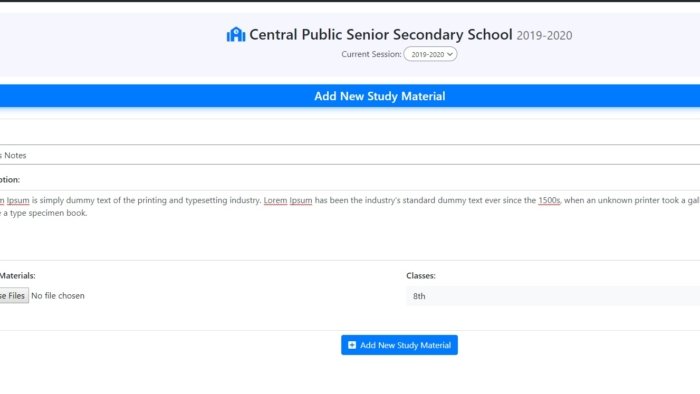
✅ Upload Study Materials — PDF notes, reference sheets, assignments — teachers upload them to the portal once and every student in the class can download them.

✅ Add YouTube Video Lessons — Teachers share YouTube video links as part of the learning material. Students watch them from their dashboard.

✅ Create Lesson Plans — Teachers can create structured lesson plans subject-by-subject and chapter-by-chapter, keeping teaching organised and trackable.

✅ Enter Exam Results — After exams, teachers enter marks subject-wise. The system calculates grades and ranks automatically.

✅ Manage Leave Requests — Teachers can apply for leave through the portal. School management approves or rejects from the admin panel.

✅ View Class Timetable — Teachers see their own timetable — which class they teach, when and where.

Why This Saves 10+ Hours Per Week

Most teachers spend 45 minutes to 1 hour every day on attendance registers, homework tracking, and mark entry. The Teacher Dashboard reduces this to under 10 minutes per day — giving teachers more energy and time for actual teaching.

Read More
35_Fee Invoices

Online Fee Payment

February 16, 2026
by websumoerp@gmail.com with No Comment Feature

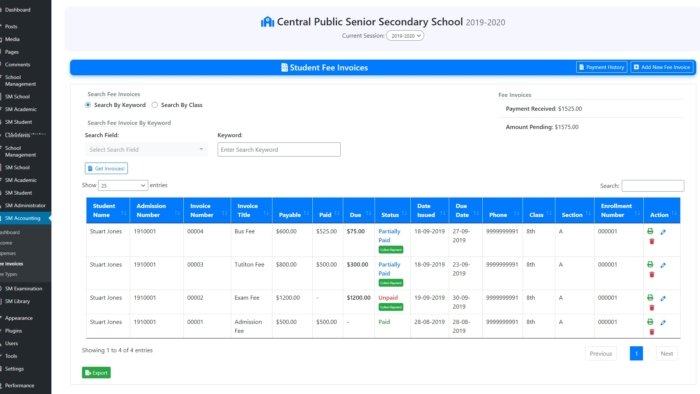
Collect school fees online 24/7. Accept UPI, Razorpay, PayTM, QR code, bank transfer and more. Auto-generate invoices and receipts. Zero paperwork, zero follow-up calls.

How Online Fee Collection Works

Fee collection is one of the most time-consuming tasks for any school. Staff make dozens of calls every month, parents forget to bring cash, and accountants spend days reconciling registers. [Your ERP Name] replaces all of this with a fully automated online fee collection system.

Parents receive a fee invoice on their phone and can pay it from wherever they are — at home, at work, or at midnight. The moment the payment is done, a receipt is generated automatically.

Payment Methods Accepted

Your school can accept fees through:

  • UPI (Google Pay, PhonePe, Paytm UPI, BHIM)
  • Razorpay (Cards, Net Banking, UPI — India’s most trusted gateway)
  • PayTM payment gateway
  • QR Code — Display a QR code for parents to scan and pay
  • Bank Transfer — For parents who prefer direct bank payment
  • SSL Commerz — For Bangladesh-based schools
  • Paystack — For African school networks
  • PayPal & Stripe — For international payments

What the Fee Module Does

✅ Create Fee Types — Define Tuition Fee, Exam Fee, Sports Fee, Library Fee separately. Each can have its own due date.

✅ Bulk Invoice Generation — Generate fee invoices for all 500 students in one click. No manual entry for each student.

✅ Partial Payments — If a parent cannot pay the full amount, they pay partially. The system tracks the balance automatically.

✅ Auto Invoice Per Student Type — Different student types (e.g., local, hostel, transport) can have different fee structures automatically assigned.

✅ Payment History — Every payment is recorded with date, amount, method, and receipt number. Fully auditable.

✅ Print or Share Receipts — Receipts are downloadable as PDF from the parent portal. No more printing physical copies.

✅ Fee Collection Reports — See daily, monthly, and yearly fee collection data. Know which students have pending fees instantly.

✅ Email & SMS Invoice Alerts — Parents receive an email and SMS when a new invoice is generated, and a reminder before the due date.

Read More
63_Student Study Materials

Study Materials & eLearning

October 11, 2025
by websumoerp@gmail.com with No Comment Feature

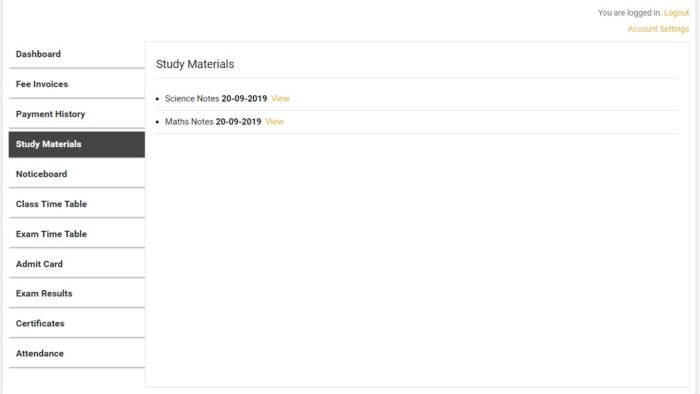
Teachers upload PDF notes, video lessons and YouTube links. Students access all learning materials from their portal — at home, at any time, on any device.

Bringing the Classroom Home

Learning should not stop when the school bell rings. With [Your ERP Name]’s study materials feature, teachers can upload and share educational content that students access from home, on weekends, and during revision periods.

What Teachers Can Share

✅ PDF Notes & Documents — Upload chapter summaries, handwritten notes (scanned), worksheets, or reference books in PDF format.

✅ Recorded Video Lessons — Teachers can record their own video lessons and upload them for students to watch at their own pace.

✅ YouTube Video Links — Share any educational YouTube video directly with a class. It appears on their portal with one click to play.

✅ Assignment Files — Share assignment papers as downloadable files.

✅ Class & Subject Specific — All materials are organised by class and subject so students only see what is relevant to them.

✅ Accessible Anytime — Students can download and access materials even outside school hours — perfect for revision, exam preparation and self-study.

✅ Lesson Plans — Teachers create structured lesson plans subject-by-subject and chapter-by-chapter, helping students understand what will be taught and when.

The Impact

Schools that share digital study materials report higher exam pass rates because students have access to revision resources at home. Parents also feel more confident when they can see what their child is studying.

Read More
49_Issue Book

Library Management

June 28, 2025
by websumoerp@gmail.com with No Comment Feature

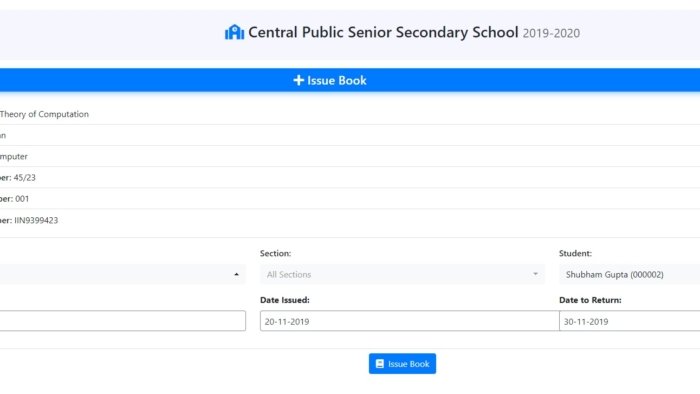
Track every book in your school library digitally. Manage issue and return records, see available stock, and know exactly which student has which book — at any time.

Digital Library for Your School

Managing a school library manually means registers, paper cards, and constant confusion about which books are issued and which are available. [Your ERP Name] replaces all of this with a simple digital library system that any librarian can operate without technical knowledge.

What the Library Module Includes

✅ Book Catalogue — Add every book in your library with title, author, ISBN, category, and quantity.

✅ Issue Books to Students — Select a student and book. Record the issue date and expected return date. The system tracks it automatically.

✅ Return Management — Mark books as returned with one click. The stock count updates automatically.

✅ Available Stock View — See instantly how many copies of any book are available and how many are issued.

✅ Student Issue History — View a complete record of all books ever issued to a specific student.

✅ Overdue Tracking — See which books are overdue and which student has not returned them, with the exact number of days overdue.

✅ Librarian Login — The librarian gets their own login with access only to the library module.

Read More
18_Add Study Material

Online Homework Management

October 14, 2024
by websumoerp@gmail.com with No Comment Feature

Teachers assign homework in seconds. Parents receive an instant SMS. Students submit through their portal. No lost notebooks, no excuses — homework made digital.

The Problem With Paper Homework

“I didn’t know there was homework.” “My child didn’t tell me.” “I forgot what the homework was.” These are sentences every teacher and parent has heard. Paper-based homework has too many gaps between assignment and completion.

[Your ERP Name]’s homework module closes all those gaps — the moment homework is assigned, it is visible to every student and their parent.

How It Works

Step 1: Teacher logs into their dashboard and clicks “Add Homework.” Step 2: Teacher selects the class, section, and subject. Writes the homework description and sets a due date. Step 3: The homework instantly appears on every student’s portal for that class. Step 4: Parents receive an automatic SMS: “New homework assigned in Mathematics. Due: 20 June 2025.” Step 5: Students complete and submit the homework through their portal by the due date.

What the Homework Module Includes

✅ Assign Homework by Class & Subject — Target specific classes, sections and subjects precisely.

✅ Attach Files — Teachers can attach PDF worksheets, images, or reference files with the homework.

✅ Automatic SMS to Parents — No parent ever misses a homework assignment again.

✅ Homework on Student Dashboard — Students see all pending homework with subjects and due dates clearly listed.

✅ Track Submissions — Teachers can see which students have submitted and which have not.

✅ Homework History — All past homework is stored and visible. Students can revisit old assignments for revision.

Read More
42_Add Exam

Exam Management, Results & Admit Cards

August 14, 2024
by websumoerp@gmail.com with No Comment Feature

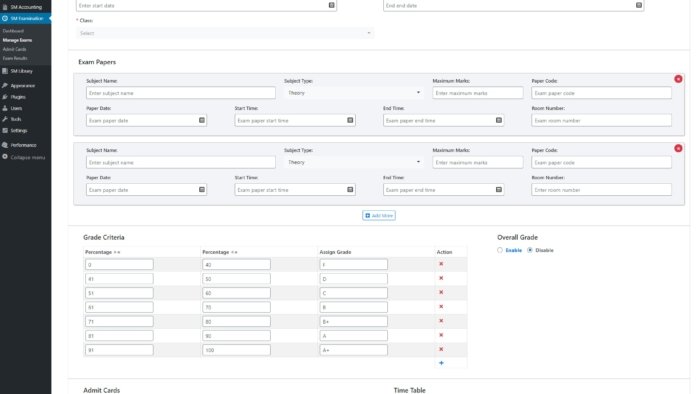
Create exams, publish timetables, generate bulk admit cards, enter results and publish grades online — all from one panel. Students see their results the moment you publish them.

The Complete Exam Lifecycle — Digitised

Managing exams involves dozens of steps: scheduling, timetable design, admit card printing, result entry, grading, and distribution. [Your ERP Name] handles every single step digitally, eliminating printing costs and days of manual work.

What the Exam Module Includes

✅ Create Exams — Name the exam (Mid-term, Final, Unit Test), assign it to classes and subjects, and set dates — all from the admin panel.

✅ Exam Timetable — Build the complete exam timetable for all classes and publish it. Teachers and students see it on their portals instantly. It is also printable as a PDF.

✅ Bulk Admit Card Generation — One click generates admit cards for every student across all classes. Admit cards include the student’s name, class, exam schedule and photo. Students download their own admit card from their portal — no distribution needed.

✅ Result Entry — Teachers enter marks subject-by-subject after the exam. The system accepts maximum marks and calculates grades automatically based on the grading criteria you set.

✅ Automatic Grade Calculation — Define your own grading scale (A+ for 90–100, A for 80–89, etc.) and the system applies it to every student’s results automatically.

✅ Student Ranking — The system calculates and displays each student’s rank in class based on total marks.

✅ Publish Results Online — When results are ready, click “Publish” and every student and parent can see the results on their portal immediately. No paper slips needed.

✅ Academic Reports — Generate class-wise and student-wise academic reports showing marks, grades, attendance percentage, and rank.

✅ Printable Report Cards — Download printable result sheets for individual students or bulk for the entire class.

Read More
  • 1
  • 2
  • Next
  • Last

Recent Posts

  • Live Classes (Zoom Integration)
  • SMS & Push Notifications
  • Teacher Login & Dashboard
  • Parent Login & Dashboard
  • Student Login & Dashboard

Recent Comments

  • SMS & Push Notifications – sumoerp.com on Book an Appointment
  • Student Login & Dashboard – sumoerp.com on Book an Appointment

Archives

  • May 2026
  • April 2026
  • March 2026
  • February 2026
  • October 2025
  • June 2025
  • October 2024
  • August 2024
  • October 2023
  • August 2022
  • June 2021
  • October 2019

Categories

  • Feature (15)
Booking

Book Service Online

From admissions to results, manage everything from one platform. Schedule a free demo and discover how easy school management can be.

Booking

Sumo ERP

One Stop Solution For SSMS

  • Home
  • About
  • Feature
  • Contact

© 2026 Sumo ERP. All rights reserved.
Instagram Linkedin-in Facebook-f Twitter
Shopping Basket